This blog is for educators and anyone looking to do something creative with digital technologies. Here you'll find resources, tips and advice. Feel free to post comments.
Showing posts with label Cross Curricular. Show all posts
Monday, 9 February 2015
February Half Term Challenge 2015 is here!
This years Theme: 3D Art Evolution
From the 17th, 18th and 19th February from 10am until 3.30pm at Sheffield Hallam Univeristy.
Labels:
Arts Project,
Children,
Creative,
Cross Curricular,
digital literacy,
Education
Friday, 25 July 2014
Summer School 24th July
What we did today.....
we were acting out our play scripts
playinng ninja with anger
Giannah
we were acting out the play scrips that we wrote on wednesday and tuesday. Purely based on real WW1 and WW2 hero's storys. We also played fun warm up games, eg. 'here is a pen' and 'ninja'. Thandie
We developed our plays and learnt all of our scripts .We also did a fun activity with Raquel that made us think about mime and freeze frames. Zaynab.
We have built on our performances about ww1. Our performances were built on Indra Lal roy a second lieutenant in the war and we have based it in the trenches. Aria.
We developed on our performance and played ninga. Parsa
Tuesday, 28 January 2014
The Reader Project strikes again!!!!!
The Reader Project strikes again!!!!
At the start of the Reader Project ( Technology)we began to plan out our ideas for our project for example the cavemen(and how we have developed from them), blood transfusions and flight(various inventions that have been created by humans through out the years and examples of how technology has changed and developed.Further information from previous weeks are as follow:
Week 1:
Our project was based on timelines like the past and the future and at the end of that session, we agreed on Technology.Then we got the homework for something that ocurred with Technology.
Week 2:
Been given was to research technology in different places around the world.
We talked about our own ideas for the project, we also drew a hand with things that we did in the past and the things we want to do in the future. The homework had
Week 3:
We gave in our homework, created a story board based on our homework and presented our work as a short drama piece, the rest of our group had to guess what we were acting out.
Week 4:
We produced a script of how our ideas would be presented, and we were given homework to type on the subject then email.We also did a short drama piece based on our scripts, we had various ideas. Eg. how we adapted, how cars were made ect.
Tuesday, 30 July 2013
Summer Challenge 2013
How have we worked together and what have we created?
Hi everyone
Welcome to the second day of Summer Challenge 2013 at Sheffield Hallam University!
Use the blog comments box to explore your group work and tell us about what you have made!
Labels:
Arts Project,
Cross Curricular,
eLearning,
Learning
Tuesday, 2 April 2013
Creating Sprites In Scratch
You awoke this morning with a burning desire to place an animated version of yourself in a Scratch games ... well this tutorial is for you!
![]() |
| The Scratch version 1.4 Interface |
You animate sprites in Scratch by changing the sprites costumes, this means that you will have to take several photos of your subject in different poses. The process is a bit like taking photos for stop motion animation.
Lets go through a list of things you need to do to successfully create your own sprites. This tutorial assumes you know how to animate sprites in scratch.
1. Taking Your Pictures
You need a digital camera - a tripod is helpful but not essential.
A webcam connected to a computer is a good solution.
If you are pretty confident using video, you can film your subjects poses and grab still images from the video.
You can take take as many pictures as you like but lets keep it to a manageable 3.
![]() |
| A webcam will transfer yours picture directly to your computer and there's no need for a tripod. |
2. Image size.
Keep you images small.
Set your image resolution/size to 480 x 360 pixels or 640 x 480 or about 1 mb in size.
3. The Pose
For inspiration check out some of the poses in the Scratch people library!
Keep your subject in the centre of the frame to get a smooth animation.
Use a green screen or a plain backdrop that contrasts against your subject.
5. Editing your Pictures
Use an image editor to erase your background.
You can use programmes like Corel Paintshop Pro or Adobe Photoshop. You can also use free image editors like GIMP or Pixlr.com.
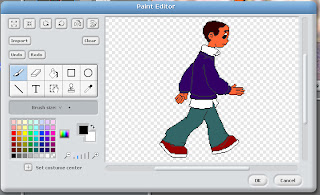
| You should see a checkerboard pattern after you take away your background |
Name your files sequentially; e.g., image1, image2, image3 then save as a .GIF or PNG file format.
6. Now lets open Scratch!
Open image1.png as a new sprite then import the rest of your images - select costumes tab - import.
6. Now lets open Scratch!
Open image1.png as a new sprite then import the rest of your images - select costumes tab - import.
| You can also use the image editor in Scratch to remove backgrounds from your sprite. |
Labels:
Animation,
Cross Curricular,
Interactive,
Scratch,
Tutorial
Friday, 2 November 2012
Fantastic Creatures - October Half Term Challenge
![]() |
| MinaLep |
The October Half term challenge created monsters!
During October halft-term 20 students from across the city used digital tools to create fantastical amalgamations of their favourite animals. Spurred on by ideas presented in nonsense poetry - i.e., portmanteau words (Snake + Shark = Snark!) students transformed the real into the mythical.
With the support of the Open University and SHEBEEN, students also had a go at being nature detectives with the OPAL project. They used digital cameras to record the insects they found then uploaded their pictures to the iSpot website for identification!
Hosted by the PIE/ArtsLab initiative, a partnership between Sheffield Hallam University's Equality and Community Engagement manager Maxine Greaves and Destinations Arts, this project was about using fun and creative ways to promote literacy, Maths and Science learning using digital technologies.
Labels:
Creative,
Cross Curricular,
Digital Imaging,
digital literacy,
eLearning,
Science
Tuesday, 17 July 2012
Archie Markham Project Launch
A media Arts and performance project celebrating the writing and life of E.A. Markham!
Fours creative's - an Actor, a Writer, a digital Artist and a Dance Artist will work with pupils from Huckolow schoool to produce a spectacualr performance for Black HIstory Month 2012!
Themed 'many voice' our first session involved pretending to be someone else. With our help, students worked out a scenario where they pretended to be old by dressing up, speaking in an old way and moving in a old way - it was fantastic!
Afterwards students evaluated their experience and told us how they wanted to project to do in the future.
Archie Markham was professor emeritus at Sheffield Hallam Unvieristy, he died in 2008.
Labels:
Archie Markham,
Arts Project,
Creative,
Cross Curricular,
digital literacy,
KS2
Sunday, 26 February 2012
Philosophy For Children: Sparking a Love of Learning
TEDxOverlake - Dr. Sara Goering - Philosophy for Kids: Sparking a Love of Learning
Labels:
Children,
Cross Curricular,
KS2,
Philosophy,
Primary
Thursday, 19 January 2012
Teachers - Publish Your Own Books!
Hot off the press from Apples big show and tell event is news of the release of the iBooks Author, a free app for iPads which means we can all become publishing moguls!
Those of you with experience of the books function of iPhoto will know that you can create beautiful looking books and calendars using the free software that arrives preloaded on macs. Well it seems like the new iBooks Author app lets you go further to create interactive images and text in the large colourful format that the playful interface of the iPad offers.
iTunes U already allows educators to distribute lectures and educational resources to students, now there is a new app to extend this functions further.
It seems Apple is ushering in a new era of publishing electronic content for learners and only time will tell if it will profoundly change the way we teach and learn. What do you think?
Labels:
apps,
Creativity,
Cross Curricular,
digital literacy,
iPad,
iPhoto,
Mac OS,
Publishing
Friday, 22 July 2011
Stories of Chat Moss, Irlam, Salford
![]() |
| The madman of Chat Moss |
Over 5 days, pupils created a series of films using recorded voices, archive photos, poetry, drama and dance. The films featured bog monsters, scooter riders, rat-catchers and Michael Jackson cameo!
These creative media sessions was part of the 'Stories of Chat Moss Project' funded by Salford Museum.
Labels:
Cross Curricular,
ICT,
Media,
Oral History,
Primary,
Video Production
Friday, 15 July 2011
Creative Partnerships Residency, Derby
![]() |
| A Ghost from a haunted school film |
The 'Media Moguls' pupil group cascaded their skills to other pupils and teachers too! After they became confident at podcasting, digital imaging, and using ICT equipment, they created written user guides and videos.
We worked together on two whole school creative media projects, one involved storytelling using stop motion animation and digital imaging manipulation Alice in Wonderland theme.
![]() |
| A Media Mogul! |
Both staff and pupils grew in confidence across a wide range of media, raised achievement and helped to develop a creative curriculum.
Funded by Creative Partnerships and The Mighty Creatives
Labels:
CPD,
Creative Partnerships,
Cross Curricular,
English,
Film,
Foundation,
ICT,
KS1,
KS2,
Maths,
Media,
Teacher Training,
Video Production
Saturday, 4 June 2011
From Primary to University!
![]() |
| Sheffield Hallam University |
I've just completed a project that used a creative approach to encouraging Primary school pupils to consider going to University!
I involved a class of Y6 pupils from Barnsley in role-play games and video making aimed at exploring thoughts and feelings about being in the grown-up space of a big City University.
Pupils created designs for their perfect classroom and had chance to edit some of the video they had shot. A fun time was had by pupils and teachers. They all received a DVD memento of their experience. Maxine Greaves, Equality and Community Engagement Manager at Sheffield Hallam University hosted the event.
Labels:
Cross Curricular,
Film,
ICT,
Media,
Primary
Friday, 20 May 2011
An Easy Stop Motion Animation Project
Equipment Needed: Digital Camera, Small Tripod, Table, Set or Backdrop, Characters, Editing Software
1. Before you start, press the menu button on your camera and set your picture quality to 2 mega pixels
2. Place you camera on a tripod in front of your Set or backdrop (make sure the maximum amount of light is falling onto your Set.
3. Decide what the physical movements you want for your characters and take a picture.
IMPORTANT: Keep your camera and tripod still during picture taking. Get someone to hold the base legs of the tripod.
4. Take 50 pictures for 25 seconds of action
5. Open your software and copy your pictures to your computers hard drive.
6. Open your editing software and import your pictures
7. Ensure that you set your still image options to 0.5 seconds (In Windows moviemaker XP 'Options', 'Advanced' 'Picture Duration In iMovie 09 - 'Project properties', 'Timing' 'Photo Duration'.
8. Place your pictures in numerical order on the timeline
9. Play your animation on the timeline
10. Checkout the 'Adding a Narration' post to add a dialogue soundtrack to your animation.
1. Before you start, press the menu button on your camera and set your picture quality to 2 mega pixels
2. Place you camera on a tripod in front of your Set or backdrop (make sure the maximum amount of light is falling onto your Set.
3. Decide what the physical movements you want for your characters and take a picture.
IMPORTANT: Keep your camera and tripod still during picture taking. Get someone to hold the base legs of the tripod.
4. Take 50 pictures for 25 seconds of action
5. Open your software and copy your pictures to your computers hard drive.
6. Open your editing software and import your pictures
7. Ensure that you set your still image options to 0.5 seconds (In Windows moviemaker XP 'Options', 'Advanced' 'Picture Duration In iMovie 09 - 'Project properties', 'Timing' 'Photo Duration'.
8. Place your pictures in numerical order on the timeline
9. Play your animation on the timeline
10. Checkout the 'Adding a Narration' post to add a dialogue soundtrack to your animation.
Labels:
Citizenship,
Creative,
Cross Curricular,
English,
History,
ICT,
iMovie,
Media,
Storytelling,
Tutorial,
Windows Movie Maker
Monday, 25 April 2011
Free Software - Scratch
![]() |
| The interface is in 3 sections; Instruction library broken into categories, the programming environment where ou can choose your animation graphics, and the Stage wher you buil |
You connect colourful jigsaw like 'instruction' pieces together to create a 'programming script' the 'script' controls and animates graphics of animals, humans, objects and fantasy creatures. You can add text, speech bubbles, music, sound effects and even record your own voice!
Recommended for Y4 upwards, and a challenge for learners at all levels
Great for 'control' and fulfils much of the ICT, English, Maths, and any other subject you want to throw into the mix.
lessons exploring the interface then you can create an dancing animations, interactive games, rainbow music machines!
It has a library of graphics for you to use or you can design your own.
community leaves the 'code' so you can replicate whta they have created
Thes best thinkg is its free! Find out more about SCRATCH and try it out
Labels:
Cross Curricular,
Free Software,
Games,
ICT,
Interactive,
Mac OS,
Media,
Primary,
Scratch,
Secondary,
Teacher Training,
Windows
Sunday, 20 March 2011
Eco Filmmaking Workshops!
| The King of Beans |
The Y6 children devised, scripted and shot several films, using a mixture of animation and live action in a green-screen studio.
The films were imaginative, funny and an informative way to discuss how we can protect the Earth's delicate eco system.
This project was supported by Art in the Park.
Labels:
Cross Curricular,
Film,
ICT,
Media,
Primary,
Video Production
Friday, 4 February 2011
Creative ICT in Early Years, Leeds
![]() |
| Magical-Den-Car-House |
This month, I completed a creative ICT residency in two Early Years settings in Leeds.
![]() |
| Toy loudspeaker phone |
Using toy loudspeakers, FLIP video cameras, easi-speak mics, cardboard, fabric scraps and tiny LED lights, we transformed indoor and outdoor spaces into magical places.
This exciting opportunity to use ICT in an unpredictable and experimental way was supported by ARTFORMS Leeds.
Labels:
Art,
Creative,
Cross Curricular,
Early Years,
Foundation,
ICT,
KS0,
Learning,
Media,
Primary,
Reggio Emilia,
Video Production
Subscribe to:
Posts (Atom)