Why all our kids should be taught how to code another Guardian article calling on the powers that be to invest in our kids futures.
This blog is for educators and anyone looking to do something creative with digital technologies. Here you'll find resources, tips and advice. Feel free to post comments.
Showing posts with label programming. Show all posts
Saturday, 18 May 2013
Why all our kids should be taught how to code
Why all our kids should be taught how to code another Guardian article calling on the powers that be to invest in our kids futures.
Labels:
digital literacy,
ICT,
programming,
schools,
Science,
solving problems,
technology
Friday, 17 May 2013
Scratch 2.0 Has arrived!
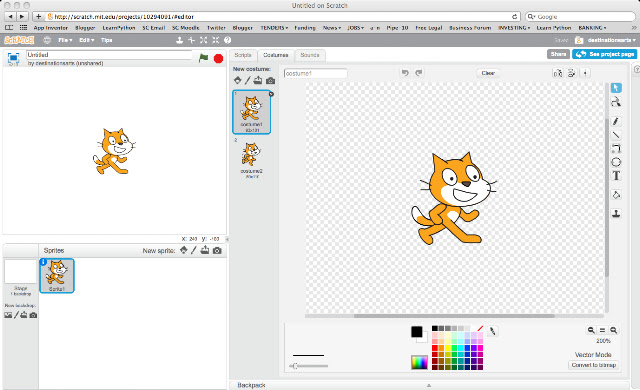
Its here... Scratch 2.0
Building on the success of 1.4 This version offers so much more.
We've been testing it out during the after school club at the University and its pretty good!
| New programming interface and program software is now web-based |
Its now web-based and offers a multitude of new programming functions and you still need an account.
Now its web-based it comes with some obvious benefits - you don't need to download software and then install, you just surf and go!
The clever bods at MIT might also develop a stand alone player so watch this space!
Labels:
After School Club,
apps,
Creative,
Free Software,
Interactive,
programming,
Scratch
The Random Excuse Generator App
The Create Project 2013 Presents the .....
The App we have all been waiting for!! Created using MIT App Inventor - a great tool for rapid prototyping!
In April during workshops at Sheffield Hallam University, Jenson Grant worked with a group of Y11 secondary school students to build the worlds most useful Mobile Phone App!
![]() |
| Design View of our App in MIT App Inventor |
Why the user would want the App and what the user was going to get out of the experience.
![]() |
| Blocks view shows you all the programming logic . You need the latest version of JAVA on your computer to run this! |
- thought about what we needed in our lives - what would make us excited!
- sketched some designs and opened MIT App Inventor accounts.
- designed an interface
- built the programming block
- tested and packaged the APP!
![]() |
| Our completed prototype ready for soft testing and distribution to our mobile device! |
The create project is an initiative supported by Maxine Greaves at Sheffield Hallam University, to encourage young people to creatively engage in digital technologies.
Labels:
Android,
Creative,
handheld devices,
Interactive,
MIT AppInventor,
mobile phones,
programming,
solving problems,
training
Monday, 3 December 2012
Scratch IT!
This month, we've been running fun programming workshops using free Scratch software.
Local Y5 primary school students made their own 'sprites' - these are graphics that you animate in Scratch - to create interactive poems based on the work of Archie Markham.
"This is Fantastic!" said Alma, and Naseem says, "I've got this at home and I'm making games with my Dad."
Students created a fantastic game called 'Shark Attack!', using sprites from Scratch and their own sprite creations. A lesson plan plus code will be online soon!
Labels:
Animation,
apps,
Children,
digital literacy,
Games,
Key Stage 3,
Primary,
programming,
schools,
Scratch,
technology
Friday, 12 October 2012
MIT App Inventor
Originally a Google Project, MIT App Inventor allows to you to create on Android based handheld devices. MIT, the makers of Scratch are now managing the project and offering loads of support to would be App developers.
The App Inventor offers a natural progression from the Scratch programming environment as it offers a similar colour coded 'drap-and-drop' coding solution.
It all online with no downloadable moving parts and if your used to Scratch and programming concepts, its very easy to pickup!
I recently created an App that translated English to Igbo, which was nice...
Labels:
Android,
apps,
College,
FE,
Free Software,
handheld devices,
ICT,
Interactive,
mobile phones,
programming
Beginners Interactive Games Workshop
1. I recently completed a series of "Introduction to Programming workshops with FE college tutors. We used Scratch, the fun code writing environment for creating interactive programs!
2. Participants followed a set of simple exercises, building on their knowledge as they went along. By the end of the first session, participants were able to create a sophisticated interactive game.

3. During the following weeks, we looked at more advanced interactive designs and how to introduce Scratch and programming concepts into the classroom.
The first Session Outline:
1. What is Scratch?
2. Understanding the Interface
3. Exercises
4. Short Game Exercise
5. Programming Concepts
Workshops are applicable to Primary and secondary settings too! For more information about delivering workshops check out the makedigital website or the teaching resources at the Scratch edu website

Labels:
apps,
College,
CPD,
creative computing,
digital literacy,
FE,
Free Software,
ICT,
programming,
Scratch
Subscribe to:
Posts (Atom)