Showing posts with label Scratch. Show all posts

Friday, 17 May 2013

Scratch 2.0 Has arrived!

Its here... Scratch 2.0


Building on the success of 1.4 This version offers so much more.

We've been testing it out during the after school club at the University and its pretty good!
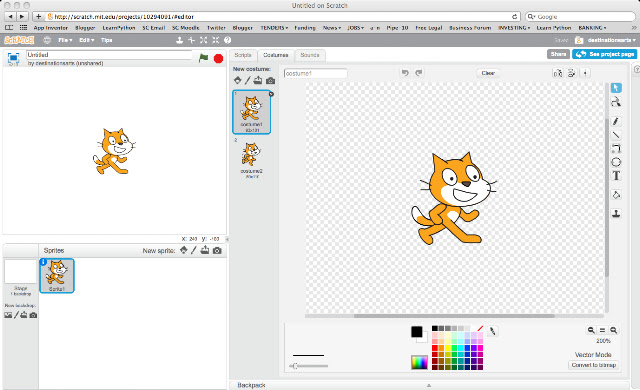
New programming interface and program software is now web-based


Its now web-based and offers a multitude of new programming functions and you still need an account.  

Now its web-based it comes with some obvious benefits - you don't need to download software and then install, you just surf and go!

The clever bods at MIT might also develop a stand alone player so watch this space!


Tuesday, 2 April 2013

Creating Sprites In Scratch


You awoke this morning with a burning desire to place an animated version of yourself in a Scratch games ... well this tutorial is for you!

The Scratch version 1.4 Interface


You animate sprites in Scratch by changing the sprites costumes, this means that you will have to take several photos of your subject in different poses. The process is a bit like taking photos for stop motion animation.


Each costume is a separate image in a different pose.

Lets go through a list of things you need to do to successfully create your own sprites. This tutorial assumes you know how to animate sprites in scratch.


1. Taking Your Pictures 


You need a digital camera - a tripod is helpful but not essential.

A webcam connected to a computer is a good solution.

If you are pretty confident using  video, you can film your subjects poses and grab still images from the video.

You can take take as many pictures as you like but lets keep it to a manageable 3.

A webcam will transfer yours picture directly to your computer and there's no need for a tripod.


2. Image size.

Keep you images small.

Set your image resolution/size to 480 x 360 pixels or 640 x 480 or about 1 mb in size.


3. The Pose

For inspiration check out some of the poses in the Scratch people library!


Keep your subject in the centre of the frame to get a smooth animation.

Use a green screen or a plain backdrop that contrasts against your subject.

A green screen or plain contrasting backdrop = easy background removal!

5. Editing your Pictures

Use an image editor to erase your background.

You can use programmes like Corel Paintshop Pro or Adobe Photoshop. You can also use free image editors like GIMP or Pixlr.com.

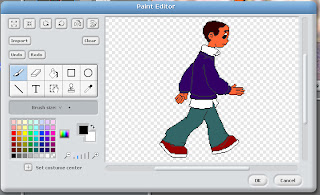
You should see a checkerboard pattern after you take away your background


Name your files sequentially; e.g., image1, image2, image3 then save as a .GIF or PNG file format.


6. Now lets open Scratch!

Open image1.png as a new sprite then import the rest of your images - select costumes tab - import.

You can also use the image editor in Scratch to remove backgrounds from your sprite. 


7. Add your code

Rearrange this code to make a basic animated sprite

You can now treat your sprite like any other sprite in scratch- well done!

Next Scratch 2.0 is here

Monday, 3 December 2012

Scratch IT!


This month, we've been running fun programming workshops using free Scratch software.

Local Y5 primary school students made their own 'sprites' - these are graphics that you animate in Scratch - to create interactive poems based on the work of Archie Markham.

"This is Fantastic!" said Alma, and Naseem says, "I've got this at home and I'm making games with my Dad."

Students created a fantastic game called 'Shark Attack!', using sprites from Scratch and their own sprite creations. A lesson plan plus code will be online soon!

Friday, 12 October 2012

Beginners Interactive Games Workshop

Changing COstume in Scratch


1. I recently completed a series of "Introduction to Programming workshops with FE college tutors. We used Scratch, the fun code writing environment for creating interactive programs! 


Animation Loop Cycle code


2. Participants followed a set of simple exercises, building on their knowledge as they went along.  By the end of the first session, participants were able to create a sophisticated interactive game.


Shark Eats Fish Score

3. During the following weeks, we looked at more advanced interactive designs and how to introduce Scratch and programming concepts into the classroom. 

 The first Session Outline:

1. What is Scratch?
2. Understanding the Interface
3. Exercises
4. Short Game Exercise
5. Programming Concepts


Workshops are applicable to Primary and secondary settings too! For more information about delivering workshops check out the makedigital website or the teaching resources at the Scratch edu website


Scratch and Raspberry Pi's


Great example of using ultra low cost computers to inspire young people to code. 

A London primary school got kids from 5 to 11 to learn about coding with Scratch, a fun free programming resource. No reason why this can't be repeated all over the country. Scratch is free to download on an Apple Mac, PC or Linux based computer OS.  

The Raspberry Pi is a £25 computer the size of a credit card. Its so cheap and powerful that it could revolutionise computing in schools!

There is also a downloadable step-by-step resource for teachers to use in class. Check out the article in Wired.

Monday, 25 April 2011

Free Software - Scratch

The interface is in 3 sections; Instruction library broken into
categories, the programming environment where ou can choose
your animation graphics, and the Stage wher you buil  
Created by those cleaver cats at MIT Education, SCRATCH is a powerful piece of software that makes programming as easy as stacking LEGO bricks! 


You connect colourful jigsaw like 'instruction' pieces together to create a 'programming script' the 'script' controls and animates graphics of animals, humans, objects and fantasy creatures. You can add text, speech bubbles, music, sound effects and even record your own voice!  


Recommended for Y4 upwards, and a challenge for learners at all levels 


Great for 'control' and fulfils much of the ICT, English, Maths, and any other subject you want to throw into the mix. 


lessons exploring the interface then you can create an dancing animations, interactive games, rainbow music machines!


It has a library of graphics for you to use or you can design your own.


community leaves the 'code' so you can replicate whta they have created


Thes best thinkg is its free! Find out more about SCRATCH and try it out