Showing posts with label digital literacy. Show all posts

Monday, 9 February 2015

February Half Term Challenge 2015 is here!


This years Theme: 3D Art Evolution

From the 17th, 18th and 19th February from 10am until 3.30pm at Sheffield Hallam Univeristy.


Wednesday, 26 February 2014

Half Term Challenge, February 2014


February Half-Term Challenge 2014

Over the past few days we have been learning about DNA , genetic engineering and synthetic biology.

I have enjoyed working as a group ,  dancing  and making a rap.I thought the quizzes and , learning about the bacteria was interesting. 
Parsa

My favourite part was doing the rap and the voice exercises, and I also liked it when we had to guess the answers for the quizzes. 
Fatimah

I learnt the many uses genetic engineering has which I  found interesting , and learning in more detail about synthetic biology even though we have done it at school . Learning the rap a making up our own dances was fun. 
Zaynab


I loved dancing and performing in the show and watching the videos
I want to do more dancing and using computers and more performance.
Makahi


It's a Wrap!

Well we've successfully completed our February 2014 Half-Term Challenge! Following our previous creative explorations of DNA, this years challenge explored the principle ideas behind bio engineering and synthetic biology. 

Over three days young people worked alongside local Artists and created dance and music and a script reading inspired by bio engineering!

Special thanks goes to the all the tech crew who helped to document events and then produced a fantastic film showing all our hard work! 

Thanks to Angga from Hantu collective for helping participants to shape their performance and to local artiste JKAS for helping the group deliver a genetics themed rap! 

Of course our challenge would not have been possible without the support of parents and Maxine Greaves MBE, Equality and Community Engagement Business Support manager at Sheffield Hallam University for hosting and facilitating the project.


Our next challenge will be in the summer.

Tuesday, 28 January 2014

The Reader Project strikes again!!!!!

                                   
                         The Reader Project strikes again!!!!


At the start of the Reader Project ( Technology)we began to plan out our ideas for our project for example the cavemen(and how we have developed from them), blood transfusions and flight(various inventions that have been created by humans through out the years and examples of how technology has changed and developed.Further information from previous weeks are as follow:

Week 1:
 Our project was based on timelines like the past and the future and at the end of that session, we agreed on Technology.Then we got the homework for something that ocurred with Technology.

Week 2
Been given was to research technology in different places around the world.
We talked about our own ideas for the project, we also drew a hand with things that we did in the past and the things we want to do in the future. The homework had

Week 3:
We gave in our homework, created a story board based on our homework and presented our work as a short drama piece, the rest of our group had to guess what we were acting out.

Week 4:
We produced a script of how our ideas would be presented, and we were given homework to type on the subject then email.We also did a short drama piece based on our scripts, we had various ideas. Eg. how we adapted, how cars were made ect.


Saturday, 18 May 2013

Monday, 3 December 2012

Scratch IT!


This month, we've been running fun programming workshops using free Scratch software.

Local Y5 primary school students made their own 'sprites' - these are graphics that you animate in Scratch - to create interactive poems based on the work of Archie Markham.

"This is Fantastic!" said Alma, and Naseem says, "I've got this at home and I'm making games with my Dad."

Students created a fantastic game called 'Shark Attack!', using sprites from Scratch and their own sprite creations. A lesson plan plus code will be online soon!

Friday, 2 November 2012

Fantastic Creatures - October Half Term Challenge

MinaLep
The October Half term challenge created monsters!

During October halft-term 20 students from across the city used digital tools to create fantastical amalgamations of their favourite animals. Spurred on by ideas presented in nonsense poetry - i.e., portmanteau words (Snake + Shark = Snark!) students transformed the real into the mythical.

With the support of the Open University and SHEBEEN, students also had a go at being nature detectives with the OPAL project. They used digital cameras to record the insects they found then uploaded their pictures to the iSpot website for identification! 

Hosted by the PIE/ArtsLab initiative, a partnership between Sheffield Hallam University's Equality and Community Engagement manager Maxine Greaves and Destinations Arts, this project was about using fun and creative ways to promote literacy, Maths and Science learning using digital technologies.
RinoWolf

Saturday, 20 October 2012

PIE Vs SheffieldArtsLab


A Digital Arts and learning collaboration/interaction between Destinations Arts and Sheffield Hallam University.

A project that experiments with interactive creative learning tools.

More information coming soon!

Friday, 12 October 2012

Beginners Interactive Games Workshop

Changing COstume in Scratch


1. I recently completed a series of "Introduction to Programming workshops with FE college tutors. We used Scratch, the fun code writing environment for creating interactive programs! 


Animation Loop Cycle code


2. Participants followed a set of simple exercises, building on their knowledge as they went along.  By the end of the first session, participants were able to create a sophisticated interactive game.


Shark Eats Fish Score

3. During the following weeks, we looked at more advanced interactive designs and how to introduce Scratch and programming concepts into the classroom. 

 The first Session Outline:

1. What is Scratch?
2. Understanding the Interface
3. Exercises
4. Short Game Exercise
5. Programming Concepts


Workshops are applicable to Primary and secondary settings too! For more information about delivering workshops check out the makedigital website or the teaching resources at the Scratch edu website


Scratch and Raspberry Pi's


Great example of using ultra low cost computers to inspire young people to code. 

A London primary school got kids from 5 to 11 to learn about coding with Scratch, a fun free programming resource. No reason why this can't be repeated all over the country. Scratch is free to download on an Apple Mac, PC or Linux based computer OS.  

The Raspberry Pi is a £25 computer the size of a credit card. Its so cheap and powerful that it could revolutionise computing in schools!

There is also a downloadable step-by-step resource for teachers to use in class. Check out the article in Wired.

Tuesday, 17 July 2012

Archie Markham Project Launch


A media Arts and performance project celebrating the writing and life of E.A. Markham!

Fours creative's -  an Actor, a Writer, a digital Artist and a Dance Artist will work with pupils from Huckolow schoool to produce a spectacualr performance for Black HIstory Month 2012!

Themed 'many voice' our first session involved pretending to be someone else. With our help, students worked out  a scenario where they pretended to be old by dressing up, speaking in an old way and moving in a  old way - it was fantastic!

Afterwards students evaluated their experience and told us how they wanted to project to do in the future.

Archie Markham was professor emeritus at Sheffield Hallam Unvieristy, he died in 2008.


Friday, 27 January 2012

Interactive Language Teaching Resource


Welcome to Coco and online interactive language teaching environment. A friendly ape/gorilla/monkey called Coco performs user directed tasks in a series of brightly coloured scenarios with onscreen text in French, English, Polish, German, Spanish and Chinese. 


Children listen, click through each scenario and repeat. Its aimed at children between the ages of (3-6 years. Words are spoken by natural speakers in each language. You need a decent computer with sound and a Flash plugin installed in your browser for it to work.

Thursday, 19 January 2012

Teachers - Publish Your Own Books!


Hot off the press from Apples big show and tell event is news of the release of the iBooks Author, a free app for iPads which means we can all become publishing moguls! 
Those of you with experience of the books function of iPhoto will know that you can create beautiful looking books and calendars using the free software that arrives preloaded on macs.  Well it seems like the new iBooks Author app lets you go further to create interactive images and text in the large colourful format that the playful interface of the iPad offers.


iTunes U already allows educators to distribute lectures and educational resources to students, now there is a new app to extend this functions further.
It seems Apple is ushering in a new era of publishing electronic content for learners and only time will tell if it will profoundly change the way we teach and learn. What do you think?


Tuesday, 17 January 2012

The Most Exciting Thing to Happen in 21st Century Education?

The Raspberry Pi computer has the potential to become one of the most important things to happen in 21st Century education and transform they way we teach and do business.


Imagine two secondhand PCs running a VDI (Virtual Desktop Infrastructure) powerful enough to drive several rooms of Raspberry Pi work stations as 'thin clients'. Your £30,000 tri-annual IT spend just dropped to £2,000!


A starting price of $25 puts it firmly in the price bracket of the cash strapped IT heads looking to cost save.


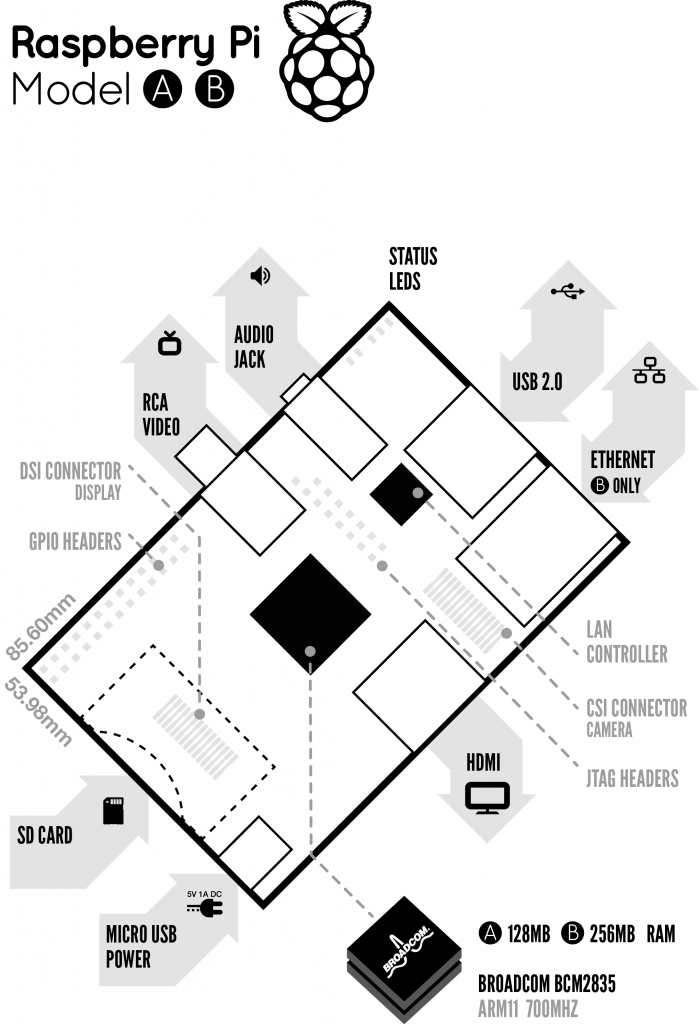
The credit-card sized computer is built by the The Raspberry Pi Foundation (a UK charity with a dream of producing cheap computers for kids) and based on an ARM processing architecture with onboard audio and video outputs and USB, HDMI and SD card slots. Unbelievably, it weights 45 gram and plays High definition video!


This makes it ideal for web surfing and web 2.0 apps, web-design and everyday IT tasks but will struggle with processor intensive applications such as video and sound editing.

Educationalists see the Raspberry Pi as a chance for school's to get pupils into programming - an important skill for this decade.

It comes Linux ready meaning it can access open source software (mostly free) which already offers the productivity of Windows software with very little learning curve - right in line with the Education Secretary's vision of an 'Open Source' future.

The machines specs include a 700MHz ARM11 CPU and 256MB of RAM. It arrives case-less, a barebones circuit board allowing users to personalise the look of their machines. The 'B' model the higher end version, comes with a $35 price tag.

The prospect of 'cheap as chips' (pardon the pun!) computer is a dream for schools, offering the possibility that parents could purchase them buy them for their children just like uniforms, stationary and pen drives, thus relieving heavily stressed budgets  - they are small enough to fit in a primary school book bag or even pencil case!

We could also be at the and the beginning of a truly personalised learning system with children sharing their machines between school and home well, until cheaper tablet computers arrive. 

Schools could enter a fully interactive educational relationship with their children. When pupils connect, teachers could grade and archive work, leaving pupils free to complete course and homework tailored to their learning needs. Pupils can work at their own pace reviewing class lessons using the textbooks and learning materials held on the device or online without clogging up the family computer.

  
Will it be a game changer? Will it usurp the big tech players and take their user base? Will it allow universal computer access for individuals and families in areas of social deprivation - the so called digital divide? If its robust enough to satisfy the wishes of so many users, maybe.

A powerful and capable computer using open software for a fraction of the cost of an Xbox - you can even use your TV as a display. It may become as ubiquitous as game boxes, just add a keyboard and mouse. If your IT suite needs a refresh, you could do a lot worse and purchase a few to run a test network.

We'll find out very soon when the first batch of 'Model B' is released anytime now, whether its a brave new world or same old present, IT lesson time definitely won't be boring!

Sunday, 15 January 2012

Digital literacy- The Guardian's Campaign


The Guardian's campaign to upgrade computer science, IT and technology teaching in schools @TheGuardian

Wednesday, 11 January 2012

Apps in Classrooms = Power!

If Michael Grove proposes genuine 'out of the box' teaching re digital literacy, giving school kids the means of digital production, the tools, the understanding to analyse, pick apart, innovate, build and share - it could be  a powerful thing.. only 'if' though!